Cash on Delivery orders usually cost more to fulfil than prepaid ones. Couriers often charge additional collection fees, failed deliveries are more common, and return rates are typically higher because customers have not paid upfront.
For many Shopify stores, adding a small Cash on Delivery surcharge helps offset those operational costs while also encouraging more customers to choose prepaid payment methods.
The challenge is that Shopify does not include a native setting for this. You cannot go into your payment settings and automatically add a fee when a customer selects Cash on Delivery at checkout.
This article explains what Shopify supports natively, why the common shipping rate workaround does not work reliably, and what works instead.
How Cash on Delivery Works in Shopify
Shopify includes Cash on Delivery as one of its built in manual payment methods. You can enable it from Settings, then Payments, then scroll to Manual payment methods and select Add manual payment method.
Once enabled, COD appears alongside your other payment methods during checkout. Customers place the order online and pay when the shipment is delivered. Shopify marks the order as payment pending until you manually mark it as paid after collection.
That is the extent of Shopify's native COD functionality.
There is no built in setting to add a COD handling fee, apply a payment method surcharge, or automatically increase the order total when a customer selects Cash on Delivery. Shopify's standard checkout settings do not support conditional pricing logic tied to payment method selection.
The Workaround People Usually Try
The workaround most commonly suggested is to create a separate shipping rate specifically for COD orders and include the surcharge inside the shipping price.
For example, a merchant might create a standard free shipping option alongside another shipping rate labelled something like "Cash on Delivery Shipping" that costs €2 more.
The problem is that Shopify does not connect shipping method selection to payment method selection. These are separate parts of the checkout flow and they operate independently from each other.
If you are not yet familiar with how Shopify shipping rates work, the article on setting up shipping rates based on weight in Shopify explains the rate system and why payment method cannot be used as a shipping condition.
A customer can still select your normal free shipping option, continue to payment, and choose Cash on Delivery anyway. When that happens, the COD surcharge tied to the shipping rate is bypassed completely.
The shipping rate workaround does not reliably collect a COD surcharge because Shopify does not enforce any relationship between shipping rates and payment methods.
For stores processing very small order volume, manually reviewing COD orders might be manageable. For larger stores, it quickly becomes inconsistent and requires checking every COD order individually.
Why Shopify Cannot Handle This Natively
Shopify supports shipping rules, discounts, taxes, and payment method availability settings, but it does not provide a native rule system that changes the order total based on the payment method selected at checkout.
This limitation exists across standard Shopify plans.
On Shopify Plus, developers can build more advanced checkout behaviour using Shopify Functions and Checkout Extensibility. In some cases, that can include custom fee logic tied to payment methods.
However, maintaining custom checkout logic introduces additional complexity and ongoing maintenance. That is why most merchants still rely on dedicated COD fee apps rather than building the functionality themselves.
How COD Fee Apps Handle This
Several apps in the Shopify App Store solve this problem by working directly with Shopify's checkout extensibility system.
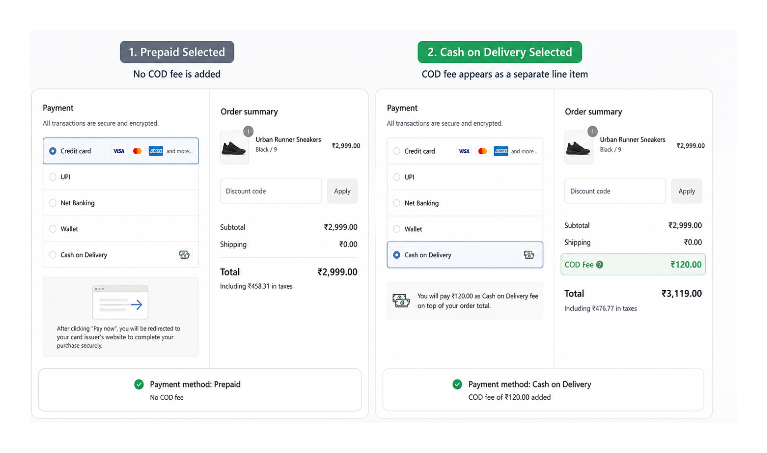
Instead of trying to manipulate shipping rates, these apps add the surcharge as a separate fee line item that only appears when the customer selects Cash on Delivery.
The customer sees the fee immediately after selecting COD at checkout. If they switch to card, UPI, PayPal, or another prepaid method, the fee disappears automatically and the total updates in real time.
This is the behaviour the shipping workaround cannot replicate.
The surcharge also appears as its own line item in the order summary, making the fee transparent to the customer and visible inside Shopify order records.
Apps such as Releasit COD Fee & Partial Pay and ACOD Cash On Delivery COD Fee solve this by adding the surcharge directly during checkout as a separate fee line item tied to the selected payment method. Most also support conditions such as country restrictions, order value limits, product restrictions, and customer verification flows.
What to look for in a COD fee app: The fee should appear during checkout before the order is placed, not afterward through a separate invoice or manual process. It should display as a clearly labelled line item such as "Cash on Delivery fee" or "COD handling fee." Apps built using Shopify's checkout extensibility system are generally more reliable than older approaches that depend on theme injection.
How to Set Up a COD Fee
The exact setup depends on the app you use, but the process is usually simple.
Install the app from the Shopify App Store, create a new fee rule, and select Cash on Delivery as the trigger payment method. You can then enter either a fixed fee such as €2 or ₹99, or configure a percentage based surcharge.
Most apps also let you define conditions. For example, you can apply the fee only for certain countries, only below a specific order value, or only when particular products are in the cart.
The fee label should be clear and customer friendly. Something like "Cash on Delivery fee" is much easier to understand than vague labels such as "additional charge."
Once configured, place a test order and verify that the fee appears correctly when COD is selected and disappears when another payment method is chosen.
Can Shopify Plus Stores Build This Without Apps?
Yes, but it is usually more complex than most merchants expect.
Shopify Plus merchants have access to Checkout Extensibility and Shopify Functions, which allow developers to customize certain parts of checkout behaviour. In some cases, developers can build custom logic tied to payment method selection.
The tradeoff is maintenance.
Custom checkout logic has to be developed, tested, maintained across Shopify updates, and monitored for edge cases across different payment methods and markets.
For most stores, a dedicated COD fee app is simpler to manage.
Communicating the Fee Clearly to Customers
Unexpected charges at checkout can increase abandonment.
If customers only discover the COD fee at the final payment step, some will leave checkout entirely. Mentioning it earlier gives them a chance to decide before they reach payment.
Most merchants mention the surcharge on their shipping policy page, FAQ page, or payment information page. A simple line such as:
Cash on Delivery orders include a small €2 handling fee.
is usually enough to make the charge feel expected rather than surprising.
If COD represents a large percentage of your orders, mentioning the fee in an announcement bar or checkout messaging can also help.
The wording of the fee itself matters too. Labels such as "Cash on Delivery fee" or "COD handling fee" are clear. Generic wording such as "additional charge" creates confusion and makes the fee feel less transparent.
Why COD Returns Are Usually the Bigger Cost
For many merchants, the courier collection fee is not actually the biggest problem with COD.
The larger issue is failed delivery and refusal rates.
Because COD customers have not prepaid, they can refuse delivery more easily if they change their mind after placing the order. When that happens, the merchant usually absorbs outbound shipping costs, return shipping costs, packaging costs, and additional operational handling.
Across many markets where COD is common, COD orders generally have higher non delivery and return rates than prepaid orders.
A modest COD surcharge can help filter out low intent purchases. Customers who are serious about completing the purchase usually accept the fee without hesitation, while lower intent buyers are more likely to switch to prepaid payment methods or abandon the order before fulfilment.
Some merchants also combine COD fees with order verification. After the order is placed, customers receive an SMS, WhatsApp message, email, or phone confirmation request before the shipment is dispatched.
This helps reduce fake orders, accidental orders, unreachable customers, and higher risk COD deliveries.
When It Makes Sense to Offer COD
Cash on Delivery remains important in many ecommerce markets, especially where card penetration or digital wallet adoption is lower and customers trust COD more than prepaid payments.
In countries such as India and parts of Southeast Asia or the Middle East, COD can still make up a large share of ecommerce orders. Removing it entirely may reduce conversion rates and limit customer reach.
At the same time, COD creates additional operational overhead.
If COD orders consistently produce high return rates, frequent delivery refusals, fake orders, or failed deliveries, restricting COD availability may be the better long term decision.
Most COD management apps allow merchants to restrict COD by country, order value, product category, shipping zone, or customer profile.
That lets stores continue offering COD where it performs well while limiting exposure in higher risk situations.
Check Local Regulations Before Adding Payment Surcharges
Some countries regulate payment surcharges or require businesses to disclose fees clearly before checkout.
Before enabling a COD surcharge, it is worth checking whether local ecommerce or consumer protection laws apply in your market.
Even where surcharges are permitted, transparency matters. The fee should appear before order confirmation, carry a clear label, and be included directly in the checkout total rather than hidden inside unrelated charges.
Final Thoughts
Shopify does not include a built in way to automatically add a surcharge when customers select Cash on Delivery.
The common shipping rate workaround only partially solves the problem because shipping methods and payment methods are completely independent parts of Shopify checkout.
For stores processing a lot of COD orders, a dedicated COD fee app is more reliable because it applies the fee directly during checkout as a separate line item.
Beyond offsetting courier costs, a COD surcharge can also reduce low intent orders and encourage more prepaid purchases.
If you are looking at other checkout problems alongside COD performance, the article on common reasons your Shopify checkout rate is low covers the problems that affect conversion.
And if COD orders are frequently being flagged for fraud review, the article on evaluating high risk orders in Shopify explains how Shopify risk indicators work before deciding whether to fulfil the order.