There is a lot of noise about connecting AI to your Shopify store. Most of it falls into two categories: course sellers telling you that you will get left behind, and sceptics dismissing it entirely. Neither is particularly useful.
The real picture is more specific. Claude can connect to Shopify through an official integration and is genuinely useful for a handful of clear tasks. It is also capable of causing real problems if you hand it write access without a review step in place.
In short: Claude is most useful for answering questions about your store data, drafting and editing product content, writing Shopify Liquid, bulk editing products, and debugging theme issues. The core rule before anything goes live: always review before applying, and never make live changes without testing first.
This article covers what works, what the connection does, and how to use it on a store that matters.
How Claude Connects to Shopify
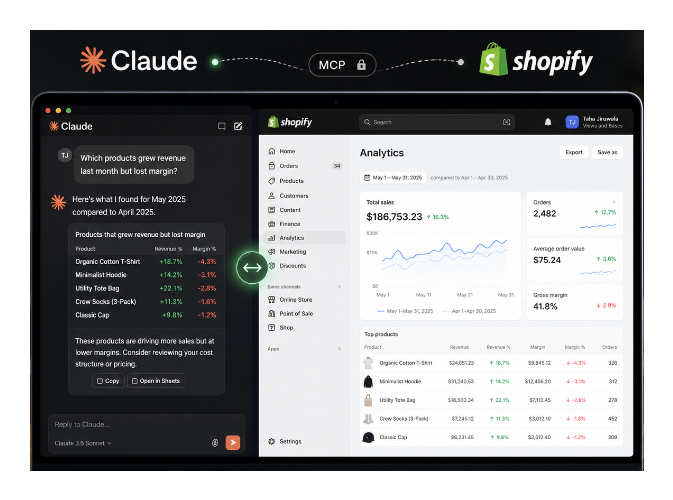
Shopify has an official AI Toolkit that provides an MCP (Model Context Protocol) connector for Claude. This is available through the Claude desktop app, where Shopify appears as a connector you can enable. Once connected, Claude can read data from your store, including products, orders, inventory, and analytics, and in some configurations can make changes.
The connection runs through the Claude desktop app, not the web interface. Shopify's developer documentation at shopify.dev covers the setup.
The Shopify MCP connector currently has a limit of 250 products per query. For stores with large catalogs, analyses that span the full product range will be incomplete unless you structure queries carefully or work in batches.
The important distinction is between read-only use (pulling data, asking questions, generating reports) and write access (editing products, publishing changes, updating prices). Most of the value is on the read side. The risk is on the write side.
Get Answers From Your Store Data Without Exporting Anything
Shopify's built-in analytics is designed around surface-level metrics. Getting a specific answer to a specific question usually means exporting data, building a spreadsheet, and doing the analysis manually.
With Claude connected to your store, you ask questions in plain language and get answers drawn from your actual data:
- Which products grew revenue last month but lost margin?
- Which of my top five items need to be reordered based on current inventory and recent sales velocity?
- Which customers have ordered three or more times but have not ordered in the past 90 days?
- Has any content on our store seen a significant traffic increase month over month, and did it lead to sales?
Questions like these would normally take an hour of export work and spreadsheet formulas. Connected to your Shopify data, they take seconds.
The value is not that Claude knows more than you. It is that it removes the friction between having a question and getting an answer.
Before using Claude for analytics though, it helps to understand what Shopify's own reports actually contain. The article on reading Shopify finance reports for basic accounting clarifies which numbers mean what, which makes your Claude queries much more precise.
Update Product Content Across Your Entire Catalog
Editing product descriptions, titles, tags, or metadata across a large catalog one product at a time is one of the most tedious tasks in Shopify. Connect Claude to your store, give it instructions on tone, length, SEO targets, or specific information to include or remove, and it reads your catalog and generates updated versions ready for review.
Use it for:
- Rewriting product descriptions to match a new brand voice
- Adding consistent materials, dimensions, or care information across a product category
- Updating product tags for a new collection or promotional structure
- Generating meta descriptions for products that have none
The key is reviewing the output before applying it. Claude works from the information already in Shopify. If a product description is missing key details, it cannot invent them accurately. Review a sample of 10 to 20 before applying changes to the full catalog.
Build Custom Theme Sections Without Hiring a Developer
Claude can write Liquid code for Shopify themes, create custom sections with JSON schemas so they are editable in the theme editor, debug issues in existing code, and build landing page or product page layouts from a reference design.
The workflow to follow: describe what you want, have Claude write the code, paste it into a duplicate theme, preview it, refine through conversation, then move it to live only after it looks right. This is how you replace paid apps and page builders without the ongoing subscription cost. The code works well for custom sections, content blocks, and layout changes. It is less reliable for complex interactive features.
Never apply theme code changes directly to your live theme without reviewing and testing on a duplicate first. Theme edits that break checkout, break mobile layouts, or conflict with existing scripts affect revenue immediately. Duplicate the theme, test, then push.
Draft Campaigns Across Multiple Tools at Once
If you connect Claude to both Shopify and Klaviyo, you can draft an entire promotional campaign in a single conversation. Describe the promotion in plain language, have Claude create product page updates, draft the email HTML, and outline the discount setup in Shopify, then review and approve before anything goes live.
The time saving is in the drafting and coordination layer rather than the creative layer. A campaign that would take several hours to pull together across tools gets structured in under an hour, leaving review time that would otherwise have been consumed by production.
Diagnose Theme and Store Issues
Pass Claude your theme code, describe the problem, and it identifies where the issue is likely coming from and what to change. Passing it a diagnostic export from Chrome DevTools and asking it to flag problems is a practical debugging workflow.
This is particularly useful if you are not a developer but need to make sense of a technical issue. It narrows down where to look rather than requiring a developer consultation for every small problem.
What Claude Is Not Good At
Claude does not help with pricing or business strategy decisions. It can surface data, but it does not understand your margins, supplier relationships, or competitive position well enough to make those calls.
It will not design a conversion-focused landing page from scratch without clear direction. Without specific examples, wireframes, or detailed instructions, the output defaults to generic structures.
It cannot replace a Shopify developer for complex app development, custom checkout extensions, or anything involving Shopify Functions. These require code review, testing infrastructure, and platform expertise that a conversational workflow does not provide.
It does not guarantee accurate outputs. Claude can be confidently wrong about Shopify-specific behaviour, especially for features that have changed recently or edge cases in the platform. Verify anything technical against Shopify's documentation before applying it.
What Not to Do
Do not make bulk product changes without reviewing a sample first. Errors in 5% of 500 products affect 25 products. Review before applying to the full catalog.
Do not give it write access to checkout-adjacent scripts. Anything that runs during checkout, payment processing, or order confirmation is high-risk. A bug that affects 1% of orders is a significant revenue loss.
Do not apply discount or pricing logic changes without testing end-to-end. Discount logic that seems correct in description can produce wrong results in practice. Test with actual checkout flows before setting anything live.
Do not skip the duplicate theme step. The convenience of making a change directly is not worth the risk on a store that generates revenue.
The Right Mental Model
Treat Claude like a very capable and fast junior operator who can take on repetitive, well-defined tasks but needs supervision before anything goes to production.
It is not a business owner who understands all the context. It is not a senior developer who can be trusted with unreviewed changes to critical paths. It is something that dramatically compresses the time cost of specific tasks if you direct it clearly and review its work before it matters.
Use it freely for analysis and reporting. Use it for drafting and content work with a review step before applying. Always use a duplicate or staging environment for any code or product changes before touching live.
Connecting Claude to Your Shopify Store
Install Claude Desktop, then look for the Shopify connector in the integrations or connections section. Shopify's developer documentation at shopify.dev/docs/apps/build/ai-toolkit covers the current setup process.
The connection requires authorising Claude to access your store through Shopify's API. Scope the permissions when setting up — limiting to read-only for initial exploration is worth doing until you are comfortable with how the connection behaves.
For theme code work, use a GitHub-based workflow alongside the MCP connection: connect your Shopify theme to a GitHub repository, use Claude in your IDE to make changes in a branch, review the diff, and push to Shopify from the branch once approved. This gives you version control and a review step that the direct Shopify-to-Claude connection does not.
The Shopify MCP connection through Claude Desktop is best for data and operations questions. For theme and code work, a GitHub-based workflow gives you better control and a review step before changes reach your store. Use both together rather than choosing between them.
Claude is not replacing Shopify expertise. It is removing repetitive work so you can spend more time making decisions and less time exporting spreadsheets, editing products one by one, or debugging simple theme issues. The stores getting the most out of it are not handing over the keys. They are building review-first workflows that combine speed with human judgment before anything goes live.
If you want to understand how Claude can help with the SEO side of your store specifically, including product page content, collection page optimisation, and appearing in AI-generated search results, the article on making your Shopify store appear in AI search results covers that angle separately from the operational use cases described here.