You get an order notification, open Shopify admin, and immediately see a red "High risk of fraud" warning on the order.
Now you are stuck between two bad outcomes:
- Ship the order and risk a chargeback later
- Cancel a legitimate customer's order for no reason
The important thing to understand is that Shopify's fraud analysis is not a verdict. A high-risk label does not mean the order is definitely fraudulent. It means Shopify detected a combination of signals that commonly appear in fraudulent transactions.
The real job is interpreting those signals correctly.
This guide explains what Shopify's fraud indicators actually mean, how to evaluate them together instead of individually, and a practical process for deciding whether to fulfill, verify, or cancel an order.
What Shopify's Fraud Analysis Actually Does
Shopify automatically reviews online card payments and assigns a risk level: low, medium, or high.
The recommendation is based on a collection of fraud signals tied to the transaction, including things like:
- IP location
- VPN or proxy usage
- Billing address verification
- CVV verification
- Payment behaviour
- Card usage patterns
Important: Shopify's fraud analysis estimates the likelihood of a chargeback. It does not confirm whether a card was stolen or whether the customer is fraudulent.
Each signal in the fraud report is shown with one of three indicator types:
- Green: Common in legitimate orders
- Red: Common in fraudulent orders
- Grey: Neutral context about the order
No single signal decides the outcome on its own. The important part is how the signals combine together.
Shopify also does not cover fraud losses automatically. If you fulfill a fraudulent order and lose a chargeback, both the payment and the product are gone.
Example: A Typical High-Risk Order
Imagine a small order comes through with the following signals:
Red indicators
- Shipping address is far from the IP location
- Order placed through a VPN or proxy
- Billing ZIP code could not be verified through AVS
Green indicators
- Correct CVV entered
- Only one payment attempt
- One credit card used
- Billing country matches order placement country
At first glance, this looks confusing. Some signals look suspicious while others look completely normal.
This is exactly why understanding the indicators matters.
What Each Fraud Indicator Actually Means
Shipping address is far from the IP address location
The IP address used to place the order is located far away from the shipping destination.
This is flagged because it is common in fraud. A stolen card may be used remotely while goods are shipped elsewhere.
But this is also extremely common in legitimate purchases:
- Gifts shipped to family
- Customers ordering while travelling
- People buying from work for home delivery
- VPN users masking location
On its own, this signal is weak. It only becomes meaningful when paired with other suspicious behaviour.
High-risk internet connection (web proxy)
The order was placed using a VPN or proxy service.
This matters because proxies hide the customer's real location, making geographic checks less reliable.
But again, many legitimate users trigger this naturally:
- Privacy-conscious customers
- Corporate VPN users
- Travellers
- Customers using public or hotel WiFi
VPN usage alone is not enough to justify cancelling an order. Combined with missing verification checks, it becomes more concerning.
Billing address or ZIP code was not available for AVS verification
AVS stands for Address Verification System.
When a customer enters their billing address, Shopify checks the numeric portion of the address and postal code against the information held by the card issuer.
This warning means verification could not be completed.
That does not always mean the customer entered incorrect information. Some banks simply do not support AVS checks.
What AVS actually checks: AVS only verifies the numeric portion of the billing address and the postal code. It does not verify the full street address or the cardholder's name.
This signal becomes more important when combined with other issues like VPN use or unusual payment behaviour.
CVV is correct
The customer entered the correct card security code.
This is one of the strongest positive indicators because it usually means the person placing the order physically had the card, or at least knew the CVV.
Fraudsters often have stolen card numbers without the CVV, since reputable payment systems are not supposed to store it.
One nuance: Shop Pay saved cards do not re-check CVV on future purchases, so legitimate Shop Pay orders may not show this as a positive signal.
One payment attempt
The customer completed checkout successfully on the first try.
Fraudsters often test multiple cards or retry failed payments repeatedly. One clean payment attempt is generally a positive sign.
Payment made with one credit card
Using multiple cards on one order can indicate card testing behaviour.
A single successful payment with one card is normal customer behaviour.
Billing country matches order placement country
The country linked to the card matches the country the order was placed from.
This is another positive consistency signal.
Reading the Signals Together
Looking at the example as a whole:
Warning signs
- VPN or proxy usage
- IP location mismatch
- Missing AVS verification
Positive signs
- Correct CVV
- Single payment attempt
- One card used
- Billing country consistency
The positive signals suggest a customer using a real card normally.
The warning signs mainly relate to location masking and missing address verification.
That combination creates uncertainty, but it is not automatically fraud.
The order value also matters. A $20 order with mixed signals is very different from a $2,000 expedited electronics order with the same signals.
Context matters.
What You Should Do Before Cancelling
When an order sits in the grey area between legitimate and suspicious, the best next step is simple: contact the customer.
Do not accuse them of fraud.
Instead, send a short verification email asking them to confirm the shipping details before dispatch.
A legitimate customer will usually respond quickly and normally.
Fraudsters often disappear once manual verification starts.
You can also check:
- Whether the email address looks legitimate
- Whether the name roughly matches the email
- Whether the shipping destination makes sense
- Whether the order value is unusually high
A strange email address alone is not proof of fraud, but combined with multiple other warning signs it adds useful context.
When to Fulfill, Verify, or Cancel
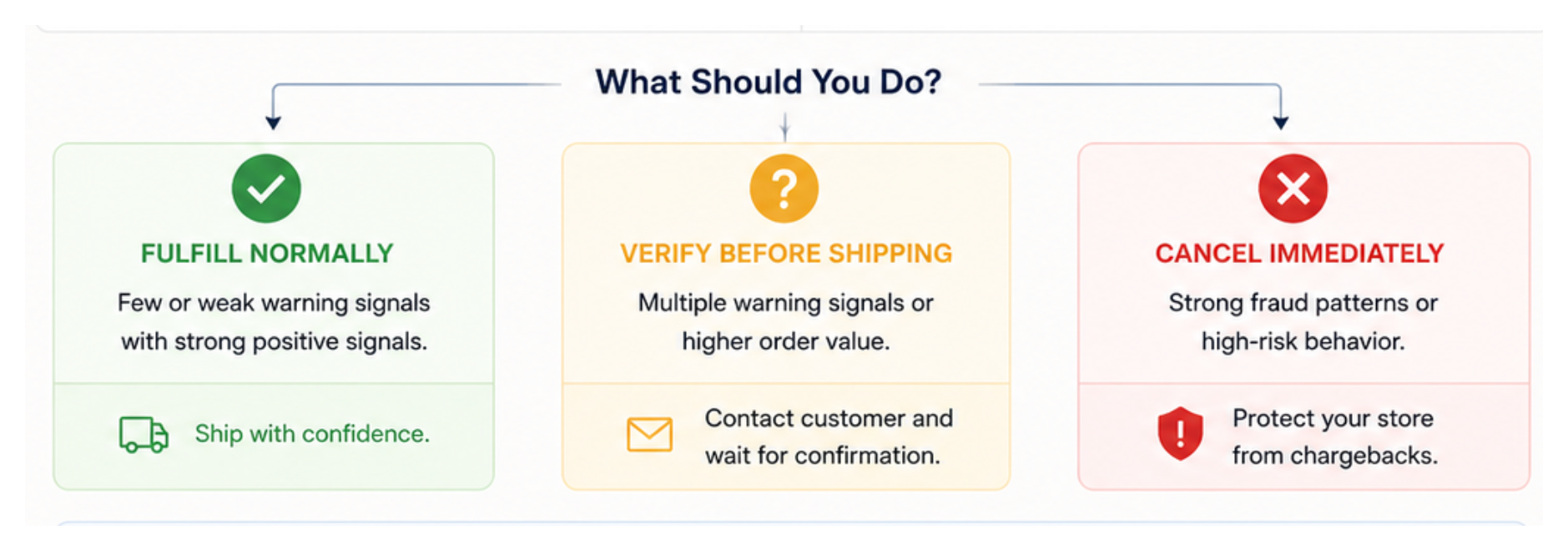
Fulfill normally
When the negative signals are weak and the positive signals are strong.
A VPN plus IP distance mismatch with correct CVV and clean payment behaviour is extremely common among legitimate customers.
Verify before shipping
When multiple warning signs appear together and the order value is meaningful.
Send a verification email and wait for confirmation before fulfilling.
Cancel immediately
When the order shows strong fraud patterns, including:
- Multiple failed payment attempts
- Multiple cards used
- Expedited shipping on expensive items
- Obviously fake customer information
- Large quantities of high-value products
Chargeback reality: If the payment is reversed through a chargeback, you lose both the product and the revenue. Repeated chargebacks can also put your Shopify Payments account at risk.
Automatically Holding High-Risk Orders With Shopify Flow
If you process a larger volume of orders, manually reviewing every flagged order becomes difficult.
Shopify Flow includes a template that automatically holds high-risk orders for review while allowing low and medium-risk orders to process normally.
To use this setup:
- Enable manual payment capture in Shopify Payments settings
- Install Shopify Flow
- Use the template called Capture payment if order is not high fraud risk
The workflow waits for Shopify's fraud analysis to complete before deciding whether to capture payment automatically.
Important: The workflow uses the "Order risk analysed" trigger, not "Order created," because Shopify's fraud analysis takes time to finish after checkout.
This setup gives you time to review suspicious orders before money is captured and inventory is shipped.
Protecting Yourself Going Forward
The single most useful protection for new stores is enabling manual payment capture.
That gives you a review window before funds are captured and before fulfillment starts.
As your order volume grows, additional fraud prevention tools may also help:
- Shopify Fraud Control
- Device fingerprinting apps
- Custom Shopify Flow rules
- Blocking known risky IP addresses or emails
The goal is not eliminating every risky order. That is impossible.
The goal is identifying the orders that genuinely deserve manual review while still allowing legitimate customers to buy without unnecessary friction.
For more on reducing checkout friction while still protecting against fraud, see common reasons your checkout rate is low.
If you offer Cash on Delivery and are seeing high-risk flags specifically on those orders, the article on adding a COD fee in Shopify explains how a modest surcharge also helps filter out low-intent COD purchases before they become fraud or return problems.
If a specific customer repeatedly triggers fraud flags or causes other problems, the guide on flagging and blocking problem customers in Shopify covers how to tag them, get notified when they order again, and when a hard block is warranted.
If you are seeing a sudden surge of high-risk orders for your cheapest products in rapid succession rather than individual suspicious orders, that pattern suggests a card testing attack rather than individual fraud. The guide on Shopify card testing attacks and how to stop them covers the full response including immediate steps, Flow automation, and how to protect your Shopify Payments account from monitoring program enrollment.