Yes. Shopify lets you restrict a discount to a single customer without creating a customer segment. When creating a discount, choose Eligibility, then Specific customers, search for the customer by name or email, and save. The code will only work for that customer at checkout.
This article covers the full setup, how to send the code, and how to automate the process with Shopify Flow if you want review rewards to go out without manual work each time.
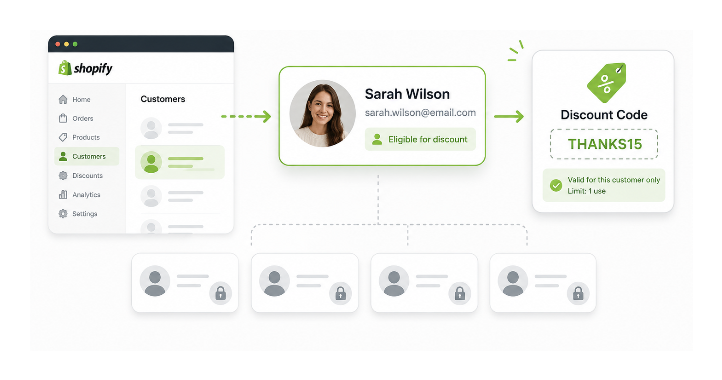
Quick Steps
- Go to Discounts in your admin and click Create discount
- Choose your discount type and set the method to Discount code
- Set the discount value
- Under Eligibility, select Specific customers
- Search for the customer by name or email and select them
- Under Maximum discount uses, set the limit to 1
- Save the discount and send the code to the customer
Creating the Discount
Go to Discounts in your Shopify admin and click Create discount. Choose your discount type: Amount off products, Amount off order, or Free shipping.
Set the discount method to Discount code and either generate a random code or type a memorable one. Set the value as a percentage or fixed amount.
Scroll down to the Eligibility section. Customer segments is selected by default. Change this to Specific customers. Customer segments are designed for targeting groups. When you are rewarding a single person, Shopify can attach the discount directly to their account, making a segment redundant.
A search field appears. Type the customer's name or email address and select them from the results.
Under Maximum discount uses, set Limit number of times this discount can be used in total to 1. This ensures the code cannot be shared or reused even if it reaches someone else.
Click Save. The discount is now tied to that customer's account and can only be used once.
The discount is matched against the customer's Shopify profile. As long as they check out using the same email address associated with that profile, the discount applies. If they use a different email at checkout, Shopify will not recognise them as the eligible customer. When sending the code, mention that they should check out while logged in to their account or use the same email address.
If you have discount combinations enabled on your store, the customer may be able to combine this code with other eligible discounts depending on your settings. Check the Combinations section when creating the discount and disable combining if you want this code to apply on its own.
Sending the Code to the Customer
Personal email (recommended for one-off rewards). Copy the discount code and email the customer directly from your own inbox. It takes under a minute and feels personal, which is appropriate when you are rewarding someone specifically for a review. The discount is already locked to their account, so there is no additional setup required.
Email from the customer profile. Go to Customers in your admin, find the customer, open their profile, and send an email directly from there. Quick but the email is plain and unformatted.
Shopify Email campaign. Create a campaign in Shopify Email, set the audience to a segment built with that customer's email address, include the code in the body, and send. More polished but adds steps for a single recipient.
For a one-off reward, personal email is the fastest and most appropriate. Save the Shopify Email approach for when you are sending the same code to a group.
Automating This With Shopify Flow
If you want review rewards to go out automatically without manual work, Shopify Flow can handle the sequence. The trigger comes from your review app rather than Shopify itself, but most review apps including Judge.me, Loox, and Okendo support Flow integration.
A practical Flow for review rewards:
Trigger: Customer tagged with left-review (added by your review app when a review is approved)
Condition: Customer does not already have the tag review-rewarded, to prevent repeat rewards if the same customer leaves multiple reviews
Action 1: Send the customer an email with the discount code included in the body
Action 2: Tag the customer with review-rewarded so the condition catches them on any future trigger
One important limitation to understand: Shopify Flow can send an existing discount code in an email, but it cannot natively generate a brand new unique code for each customer during the workflow. The code in the email is a single pre-created code. Setting it to one use and tying it to the specific customer's account in the Eligibility section is what makes it safe to send through an automated flow.
If you need fully unique discount codes generated per customer automatically, Omnisend's unique coupon feature or dedicated discount code apps integrated with Flow can handle this. The native Flow approach sends a single pre-created code, which works well when the one-use and specific-customer limits are set correctly on the discount.
When Each Method Makes Sense
| Method | Best For | Pros | Cons |
|---|---|---|---|
| Specific customers | One customer | Fastest, no segment needed | Manual each time |
| Customer segment | Multiple customers at once | Scales well | Requires building a segment |
| Shopify Flow | Recurring automated rewards | Runs without manual work | Static codes unless using a third-party app |
One customer: use Specific customers. Many customers at once: use a customer segment. Recurring rewards triggered by an action: automate with Flow.
What the Segment Approach Is Actually Useful For
The segment approach is the right method for a different scale of the same problem. If you want to reward all customers who have left a review over the past three months, a segment built with the filter customer_tags CONTAINS 'left-review' instantly includes everyone with that tag. You create one discount targeting that segment, send one campaign, and every eligible customer gets access.
One behaviour worth knowing: when you create a discount specific to a customer segment, it applies only to existing customers with a Shopify account. Customers checking out as guests for the first time will not be included in the segment until after their first order completes and a customer profile is created.
The Email Alongside the Code
Whether you automate this or handle it manually, the message you send with the discount code matters. A message that specifically references the review the customer left and thanks them for it converts better and creates more goodwill than a generic code delivery.
Customers who feel personally recognised are more likely to leave additional reviews, recommend the store to others, and return. The discount is the mechanism. The message is what makes the reward feel meaningful rather than transactional.
For the broader question of building trust and getting more reviews from happy customers who currently are not leaving them, the article on building trust with cold traffic when you have few reviews covers the full picture.
If you are running broader promotions alongside individual rewards, the article on setting up a weekly deals section in Shopify covers the tag and discount structure that keeps both types of promotion manageable. And the same customer tagging system works in the other direction too — the article on flagging and blocking problem customers in Shopify covers how tags let you get notified when a specific customer orders again.
If your goal is giving a group of tagged customers a custom per-SKU price list rather than a one-off code, that is a different problem entirely. The guide on setting up VIP custom pricing by customer tag in Shopify covers why native discounts fall short for that and what actually works.