Every Shopify store starts with a free yourstore.myshopify.com address. Before launching, most merchants replace it with their own domain, like yourstore.com. You can either buy the domain directly through Shopify or connect one you already own from a third-party registrar. Both work, but each has different trade-offs.
Buying a Domain Through Shopify
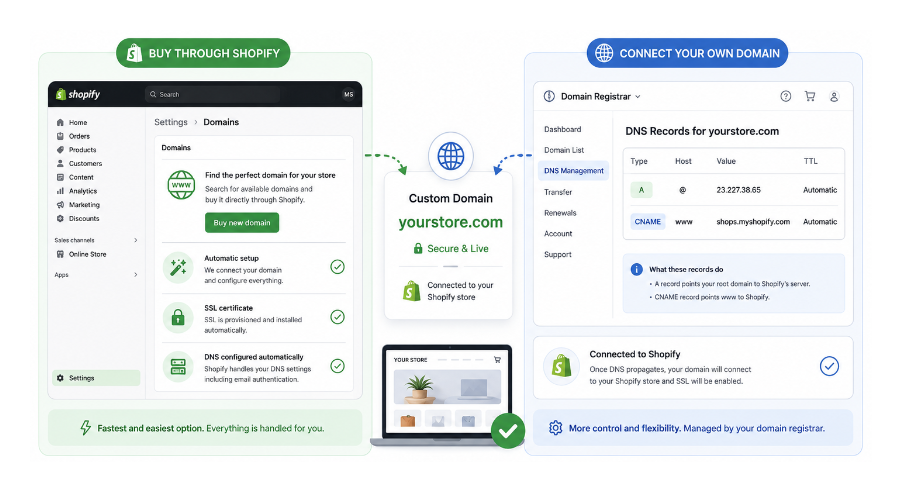
When you buy a domain through Shopify, the entire connection process is automatic. Shopify configures your DNS records, provisions your SSL certificate, and connects the domain to your store without you touching a single setting. The domain and store management are in the same admin panel.
If you are setting up your first store with no DNS experience, this is the fastest path from no domain to a live store.
The process: go to Settings in your Shopify admin, then Domains. Click Buy new domain. Type the domain name you want and Shopify will show you availability and pricing. Purchase it, and it is automatically connected and set as your primary domain.
When you buy a domain through Shopify, email authentication records including DKIM, SPF, and DMARC are configured automatically. This means notification emails from your store are less likely to be flagged as spam. If you connect a third-party domain instead, you need to add CNAME records for DKIM and SPF manually, and add a separate DMARC TXT record, to get the same result.
The Limitations of Buying Through Shopify
Shopify does not offer custom email hosting. You can set up email forwarding, where emails sent to [email protected] are forwarded to your personal inbox, but you cannot host a full business email account through Shopify. If you want a proper business email with its own inbox, you need a third-party service like Google Workspace or Microsoft 365, which you then connect to your domain by adding MX records. This works whether your domain is registered through Shopify or a third-party registrar.
Shopify also has a narrower range of domain extensions than dedicated registrars. Popular extensions like .com, .net, .org, and .store are available. Country-specific extensions like .de, .es, or .co.uk, and specialised extensions, may not be. If you need a specific extension that Shopify does not offer, a third-party registrar is your only option. If you sell internationally and want to connect multiple country-specific domains and redirect traffic by region, that is also possible on certain Shopify plans but requires the domains to be purchased or managed separately.
Should You Keep Your Domain Separate?
The most significant argument against buying through Shopify is consolidation risk. If your domain and your store are both managed by the same provider and something goes wrong with your Shopify account — a security issue, a policy violation, or a billing problem — both your store and your domain are affected simultaneously.
Your domain name is arguably your most important business asset. All your SEO value, your brand recognition, and your customer relationships are tied to it. Keeping it with an independent registrar also makes it easier to move your website in the future, whether you migrate away from Shopify, use the domain for additional services, or need to resolve account issues. The domain stays under your control regardless of what happens with your store.
Domains can be transferred away from Shopify to another registrar, but not within the first 60 days after purchase or transfer. If you buy through Shopify and then decide to move platforms, you will need to wait out that window before transferring the domain.
For a brand new store testing an idea, consolidation risk is not a material concern. For a store generating real revenue with meaningful traffic, keeping the domain at a dedicated registrar is the more cautious approach.
Shopify Domain vs Third-Party Registrar at a Glance
| Buy Through Shopify | Buy from a Registrar | |
|---|---|---|
| Setup | Automatic | Manual DNS configuration |
| DNS management | Inside Shopify admin | At your registrar |
| Email authentication | Automatic | Manual DKIM, SPF, DMARC |
| Domain extensions | Limited | Wide selection |
| Domain ownership | Tied to Shopify account | Independent |
| Best for | First stores, fast setup | Established stores, flexibility |
How to Connect a Third-Party Domain to Shopify
If you have bought or already own a domain from a registrar like Namecheap, GoDaddy, Porkbun, or Cloudflare, connecting it to Shopify requires updating two DNS records in your registrar's DNS settings.
Log in to your domain registrar account and go to the DNS settings for the domain.
You need to set:
A record: point this to Shopify's IP address, 23.227.38.65. If there is already an A record present, update it to this value. If there are multiple A records, delete all of them except the one pointing to Shopify's address.
CNAME record: set the host to www and point it to shops.myshopify.com.
Save your changes. Most connections complete within an hour, but DNS propagation can take up to 48 hours depending on your registrar and DNS provider.
After updating the records, go to Settings, then Domains in your Shopify admin. Click Connect existing domain. Enter your domain name and follow the prompts. Shopify will check whether the DNS records are pointing correctly.
If you are using Cloudflare to manage your DNS, set both records to DNS only (grey cloud) while connecting the domain. If the Cloudflare proxy is enabled during the connection process, Shopify may not be able to verify the domain correctly.
If your domain has DNSSEC enabled, Shopify does not currently support it and it will prevent your domain from connecting correctly even if all other DNS records are right. Check your domain registrar's settings for a DNSSEC option and disable it before connecting. The change can take up to 48 hours to propagate.
Setting Your New Domain as Primary
After adding a custom domain, Shopify automatically sets it as your primary domain. Your old myshopify.com address continues to exist and redirects to the primary domain. You cannot delete the myshopify.com address entirely, but customers will never see it unless they somehow access it directly.
To check or change your primary domain, go to Settings, then Domains. The primary domain is marked with a Primary label. To change which domain is primary, click the domain you want and select Set as primary.
What Happens to Your Old myshopify.com URL
Your myshopify.com URL never goes away. It is your store's permanent internal identifier and Shopify uses it for internal operations regardless of what your custom domain is.
From a customer-facing perspective, anyone who visits yourstore.myshopify.com is automatically redirected to your primary custom domain. Old links, bookmarks, or indexed pages at the myshopify.com address will continue to work and forward correctly.
Choosing a Good Domain Name
A domain name is hard to change once your store is established. Every link, every piece of marketing, and every bit of SEO is attached to it. A few things to get right from the start:
Keep it short and easy to spell. If you have to spell it out when saying it aloud, it is likely to cause confusion.
Match your brand name as closely as possible. Customers who look you up after hearing about you will type your brand name into a browser. Your domain should be what they find.
Avoid hyphens and numbers in most cases. These are harder to communicate verbally and easier to mistype.
If your exact .com is taken, a country-specific extension like .co.uk or a newer extension like .store can work, but .com is still the default expectation for most customers globally.
It is worth securing your domain as soon as you have settled on a brand name, even if your store is not ready to launch yet. Good domain names get taken.
The Bottom Line
If you are launching your first Shopify store and want to get live quickly without touching DNS settings, buying a domain through Shopify is the simplest option. If your business is already established, or you want maximum flexibility and independence from a single provider, registering the domain with a third-party registrar and connecting it to Shopify gives you greater long-term control.
For a broader view of what helps your store get found in search and AI results once the domain is live, the article on making your Shopify store appear in AI and search results covers what actually moves the needle there. And if you have recently migrated from another platform and need to protect existing SEO through the domain change, the article on catching missing 404 redirects after a migration covers how to ensure nothing gets lost.