You have 4 lbs of tea. You sell it in 10g, 30g, and 50g packages. Every time you sell any of those sizes, it should reduce your total tea stock. In Shopify, that is not how inventory works by default.
Shopify tracks inventory per variant as a unit count. Each variant has its own quantity field. When a 30g bag sells, Shopify decrements the 30g variant's count by one. It has no awareness that the 30g bag is connected to a shared pool of bulk tea, and it makes no deduction from the 10g or 50g variant counts.
This means that as a tea merchant, you have to mentally translate between units of each variant sold and total grams consumed to know whether you are running low on stock. That translation breaks down fast when you have multiple teas, multiple sizes, and regular sales across all of them.
Short Answer
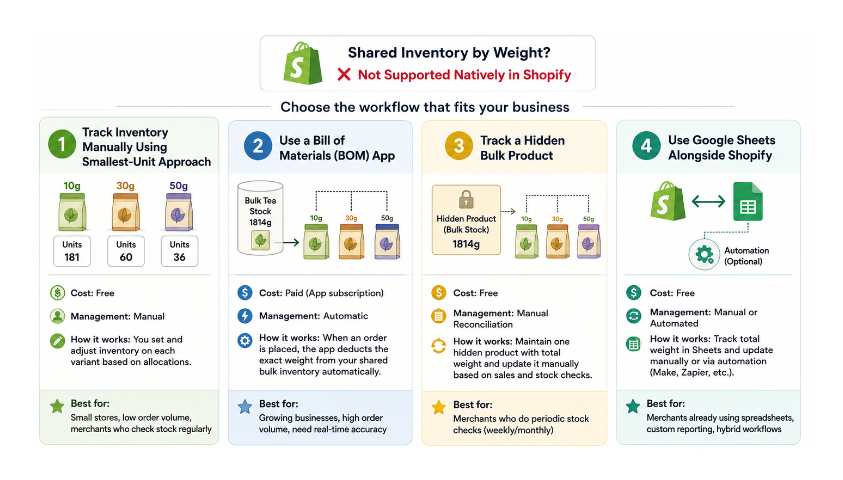
Shopify cannot natively track one shared inventory pool that multiple weight-based variants consume. There is no setting that enables this. Your options are:
- Track inventory manually using a smallest-unit approach
- Use a Bill of Materials app that deducts from a shared pool automatically
- Track a hidden bulk product as your source of truth and reconcile manually
- Use Google Sheets alongside Shopify, with or without automation
This article covers each option in detail, including which fits different situations.
Why Shopify Does Not Support Shared Weight Pools
Shopify's inventory model was designed for discrete unit products. A t-shirt in size medium is a distinct item. Selling one removes exactly one from stock. There is no concept within Shopify's native system of a shared raw material pool that multiple finished products draw from.
This is not a gap that will be filled by changing a setting. It is a fundamental architectural decision about what Shopify's inventory system is designed to track.
There is no Shopify setting that enables shared inventory by weight. If you need this behaviour, you will need an app or a manual process.
The limitation affects any business that sells the same physical substance in multiple package sizes: loose-leaf tea stores, coffee roasters, herb and spice merchants, refill shops, supplement companies, pet food retailers selling by weight, or any store selling liquids in multiple bottle sizes.
Which Approach Fits Your Situation
| Method | Cost | Automatic | Best For |
|---|---|---|---|
| Smallest unit tracking | Free | No | Small stores with infrequent sales |
| Bill of Materials app | Paid | Yes | Growing businesses processing daily orders |
| Hidden bulk product | Free | No | Manual stock checks on a regular cadence |
| Google Sheets | Free | Semi-automatic | Stores already using spreadsheets for operations |
Workaround 1: Track in Your Smallest Unit (No App Required)
The most practical free workaround is to set each variant's inventory to the maximum number of bags you could make from your total stock if you sold only that size, then manage allocations manually.
For a tea store with 10g, 30g, and 50g sizes and 4 lbs (approximately 1814g) of stock:
- 10g variant: 181 units (1814 divided by 10)
- 30g variant: 60 units (1814 divided by 30)
- 50g variant: 36 units (1814 divided by 50)
These are not shared counts. They are independent allocations representing how many of each size you have chosen to make available from your total stock. Selling 10 units of the 30g bag consumes 300g of your bulk tea, but Shopify does not automatically deduct anything from the 10g or 50g variant counts. You do that manually when you reconcile.
Think of each variant's count as an allocation rather than a live reflection of remaining stock. You are deciding upfront how much of your bulk supply to commit to each size, and you update those allocations when you restock or when you check inventory periodically.
This approach works well for stores with a small number of bulk products and a regular stock-check cadence. It breaks down if you have many products, many sizes, and high order volume, because the manual reconciliation becomes too frequent to be practical.
Workaround 2: Bill of Materials Apps
The proper solution for shared bulk inventory is a Bill of Materials approach. You define a raw material representing your total bulk stock, and you define how much of that raw material each variant consumes. When a 30g bag sells, the app deducts 30 from your bulk tea inventory automatically.
The general setup across these apps works as follows:
Create a raw material item in the app representing your total bulk stock. For the tea example, this might be "English Breakfast Loose Leaf" with a quantity set in grams.
Create bundle or recipe definitions for each variant. The 10g bag consumes 10 units of the raw material. The 30g bag consumes 30 units. The 50g bag consumes 50 units.
When an order comes in, the app intercepts it, reads the recipe, and deducts the corresponding quantity from the raw material pool. It also updates the available quantity on each variant to reflect what can still be made from remaining stock.
When evaluating apps for this purpose, check reviews specifically from merchants selling bulk goods by weight. An app that works well for shared component inventory (like shared colour components across product variants) may not handle fractional gram calculations correctly for bulk goods. The use case looks similar but the failure modes are different.
Workaround 3: Separate Bulk Inventory Product
A simpler version of the Bill of Materials approach that requires no app is to create a separate hidden product representing your total bulk stock.
Create a product called something like "English Breakfast - Bulk Stock (internal)" and set its inventory in grams. Set it to Draft so customers cannot see or buy it. This product is purely your stock tracking record.
When you receive a new shipment, update this product's inventory to reflect the new total.
When you reconcile, calculate what you should have left based on the variants sold (units of 10g sold multiplied by 10, plus units of 30g sold multiplied by 30, and so on) and update the bulk product accordingly.
This gives you one place to record your true bulk stock without needing to translate across variant counts. It still requires manual reconciliation, but it works well for coffee roasters, herb merchants, and similar stores that do a weekly or monthly stock check rather than needing live accurate counts.
Workaround 4: Google Sheets as the Source of Truth
For merchants who already use Google Sheets for inventory and would rather not add an app, tracking bulk stock in Sheets alongside Shopify is a workable approach.
Maintain a sheet that tracks total grams in stock. When orders come in, either manually update the sheet or use a Make or Zapier automation to pull Shopify order data and deduct the correct grams per line item automatically.
Shopify remains the system of record for customer-facing inventory counts, while Sheets holds the real-world raw material count.
The article on syncing Shopify inventory to Google Sheets covers how to pull Shopify's variant inventory data into Sheets automatically, which you can use as the starting point for this kind of hybrid tracking setup.
Setting Customer-Facing Inventory Correctly
Regardless of which internal tracking method you use, you need to decide what inventory count customers see for each variant.
The most conservative approach is to calculate the maximum number of each bag size that can be made from your total stock and set that as the available quantity. If you have 500g of tea, you can make 50 units of the 10g bag, 16 units of the 30g bag, or 10 units of the 50g bag.
If you allow all three sizes to sell simultaneously up to those limits, a customer buying the last 10 units of the 50g bag has consumed all 500g, even if your 10g and 30g variant counts have not changed. Without a live-linked app, you need to manually zero out the other variants when this happens.
If precise real-time stock accuracy across all variants is important to your operation, a Bill of Materials app is the only approach that handles this automatically. The manual workarounds require periodic reconciliation and create windows where overselling is possible if multiple customers are buying simultaneously.
Preventing Overselling During Low Stock
As your bulk stock gets low, the risk of overselling increases. A customer buys the last 30g bag at the same moment another customer adds a 50g bag to their cart, and you do not have enough stock to fulfil both.
The safest option when stock is low is to manually reduce or zero out the larger package sizes first. If you have 60g left, only the 10g variant should remain available. Set the 30g and 50g variants to zero to prevent orders you cannot fulfil.
Rather than hiding sold-out sizes entirely, some merchants keep them visible and capture demand through a back-in-stock notification. A customer who wanted the 50g bag but found it sold out can leave their email and be notified when you restock. STOQ handles this alongside preorders and gives you demand data showing which sizes customers are waiting for most — useful for deciding how much of each size to produce in your next batch.
The guide on automatically hiding products when they go out of stock covers how to use Shopify Flow to hide a variant automatically when its inventory hits zero, which reduces the manual work of monitoring and zeroing out sizes as stock depletes.
Receiving New Bulk Stock
When a new shipment arrives, update each variant's inventory to reflect what can now be sold from the new total.
If you use the purchase order system in Shopify to track incoming stock, remember that purchase orders track units per variant, not grams in a shared pool. You would record separate line items for each variant size on the purchase order rather than one line item for the bulk quantity. The guide on how Shopify purchase orders and incoming inventory work covers how to use POs to track expected stock across multiple variants before it arrives.
Choosing the Right Approach
If you sell only a handful of bulk products and orders come in a few times a week, a manual workflow is usually sufficient. The smallest-unit approach or a hidden bulk product keeps things simple without adding app cost or setup complexity.
Once you are processing orders every day across multiple bulk products and multiple sizes, the manual reconciliation compounds quickly. At that point, a Bill of Materials app typically saves more time than it costs. The setup takes a few hours, but the ongoing reconciliation time it eliminates adds up fast for high-volume stores.
The right choice depends less on how much stock you hold and more on how frequently it moves. A supplement company selling by weight with fifty orders a day needs automation. A refill shop doing ten orders a week can manage manually without much friction.