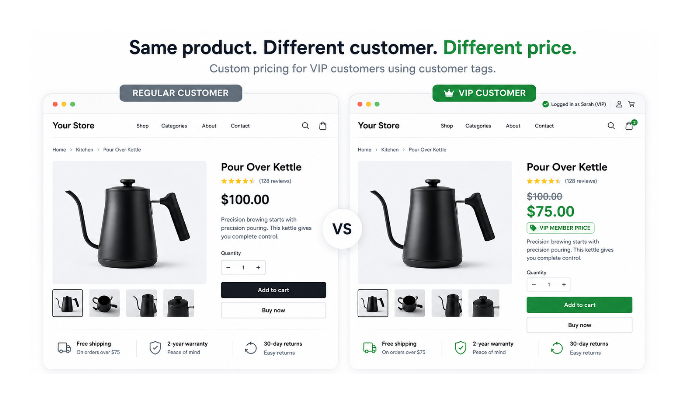
You want to tag certain customers as VIP and show them a custom price list where each product has a specific pre-calculated price — not a blanket 20% off everything. When that VIP customer logs in, they should see their prices on the product page and pay those prices at checkout.
Short answer: If you want VIP customers to have completely different prices for individual products, Shopify's native discounts cannot do it. You need either a Shopify Functions-based solution (usually via an app or custom development) or Shopify B2B Catalogs if you are selling to registered business accounts. A global percentage off for all VIP customers is the one case native discounts handle without any additional setup.
This article covers exactly what each approach does, where it breaks down, and what actually works for a custom per-SKU price list per customer tag.
What Shopify's Native Discount System Can and Cannot Do
Shopify's native discounts support targeting by customer segment. You can create a segment using the filter customer_tags CONTAINS 'VIP', then create an automatic discount that applies only to customers in that segment. The discount applies at checkout automatically when a tagged customer has items in their cart.
The limitation is that native discounts are percentage-based or fixed-amount-off across a product, collection, or order. You cannot use native discounts to say "for SKU-123, the VIP price is $47.50" and "for SKU-456, the VIP price is $23.00." The native system expresses discounts as reductions from the regular price, not as pre-set alternative prices.
For a global 20% off for VIP customers, the native segment-based automatic discount works perfectly and requires no app. For a custom price list where each SKU has a specific VIP price, native discounts cannot express that relationship.
Approaches at a Glance
| Approach | Different Product Page Price | Correct Checkout Price | Good for Per-SKU VIP Pricing |
|---|---|---|---|
| Native discounts | No | Yes | No |
| Liquid only | Yes | No | No |
| Shopify Functions | Yes | Yes | Yes |
| B2B Catalogs | Yes | Yes | Yes, for business accounts |
Why Liquid Code Is Not Enough
Shopify Liquid can display different prices to different customers based on their tags. If a customer is logged in and has the VIP tag, a Liquid snippet can calculate and show a different number on the product page. The code reads customer.tags, checks for the VIP tag, and applies a math filter to display an adjusted price.
The problem is that Liquid only affects what is rendered on the page. It does not change the price in the cart or at checkout. A customer who sees a Liquid-calculated VIP price on the product page will still be charged the regular price when they complete their order. The cart and checkout operate independently of what Liquid renders on the product page.
Any approach that only modifies the Liquid template for display purposes does not give the customer the actual discounted price at checkout. If customers notice the discrepancy between the displayed price and the checkout price, it creates a trust problem. Liquid-only approaches are only appropriate for rough previews, never for real VIP or trade pricing.
For the actual checkout price to change based on a customer tag, you need either a Shopify Functions-based solution or a native Shopify mechanism that operates at the cart and checkout level.
The Correct Architecture: Metafields Plus Shopify Functions
The technically correct approach for per-SKU custom pricing by customer tag is to store the VIP price for each variant in a metafield, then use a Shopify Functions-based discount at checkout to read the customer's tags and apply a discount that reduces the line item price to the metafield value.
To make this concrete: a variant with a regular price of $75 has a metafield vip_price set to $58. When a customer with the VIP tag checks out, the Function reads that metafield and applies a discount that brings the checkout line item price to $58. On the product page, Liquid reads the same metafield and displays $58 to the logged-in VIP customer. The price they see and the price they pay are the same.
This is the standard architecture for implementing customer-specific pricing in Shopify today.
Shopify Functions and the Scripts Retirement
Shopify Scripts, which previously handled checkout-level price modification for Shopify Plus stores, is being retired on June 30, 2026. Any solution currently using the Script Editor needs to migrate.
Shopify Functions is the replacement. It runs at the checkout level natively and is available on all Shopify plans, not just Plus. Functions-based discount apps apply their pricing logic in the same place Scripts did, but they are faster, more scalable, and officially supported going forward.
If you encounter older advice recommending the Script Editor for customer tag-based pricing, that approach is no longer viable for new implementations and will stop working entirely on June 30, 2026.
Shopify B2B Catalogs: When They Fit and When They Do Not
Shopify's B2B Catalogs let you create price lists and assign them to Companies. A Company is a business entity in Shopify's B2B system, and each customer who should have access to the price list needs to be added to a Company as a contact.
If you are selling to registered businesses with dedicated account managers, negotiated pricing, and purchase orders, B2B Catalogs are an excellent fit. The price list management is built for that context and handles the complexity well.
If you are rewarding loyal individual consumers who have earned a VIP tag based on their purchase history, creating a Company entry for each one is operationally impractical. The B2B system is designed for business-to-business relationships, not consumer loyalty tiers. For that use case, customer tags with a Functions-based pricing solution are the right approach.
Using an App for Customer Tag-Based Custom Pricing
Several Shopify apps implement the metafield-and-function architecture behind the scenes. You define price lists, assign them to customer tags, and the app manages the Liquid display and the Functions-based checkout application without you writing any code.
If you manage thousands of products, you will also need a process for keeping VIP prices up to date. Most pricing apps provide bulk import or synchronisation tools for this. A custom-built solution requires maintaining the metafields yourself, which becomes a significant operational burden at scale.
Wholesale Pricing Discount B2B supports this workflow. You can create a VIP price list with individual prices per SKU, assign it to a customer tag, and tagged customers see and pay those prices. It also supports percentage-based discounts per tag if you want to mix flat percentage tiers alongside custom price lists.
When evaluating any app for this use case, confirm it uses Shopify Functions rather than Shopify Scripts for the checkout-level price application. Scripts stop working June 30, 2026. An app that has not migrated to Functions will break at that date. The app listing or support documentation should confirm Functions compatibility.
How to Tag Customers as VIP
Regardless of which approach you use, tagging customers is handled in Shopify admin or via automation.
Manual tagging: Go to Customers, open the customer profile, and add the VIP tag in the Tags field. This works for a small number of accounts you manage individually.
Shopify Flow automation: Build a Flow workflow that adds the VIP tag when a customer meets a condition — total spend above a threshold or number of orders above a threshold. The trigger is either Order created with a cumulative spend condition, or Customer updated to react to other changes. This is the right approach for a growing VIP program where customers earn the tag automatically.
What to Show Tagged Customers
Once the pricing is in place, a few things improve the VIP customer experience:
Show the VIP price clearly on the product page alongside the regular price, similar to how compare at price works. Customers should be able to see that they are getting a special rate, not just see a lower number with no context.
Make it clear that the pricing is account-specific and requires login. A note near the price that says "VIP member price — log in to apply" sets the right expectation for tagged customers browsing while not logged in.
Avoid showing the VIP price to non-tagged customers. If the Liquid code that renders the VIP price runs for all visitors, customers without the tag who see the lower price will expect to pay it. This creates friction at checkout when they cannot get the price they saw.
Which Approach Should You Choose
| If you want | Use |
|---|---|
| A percentage off everything for VIP customers | Native automatic discounts |
| A fixed custom price per SKU for VIP customers | Shopify Functions via app or custom build |
| Company-specific wholesale pricing for business accounts | Shopify B2B Catalogs |
| Per-SKU VIP pricing without writing code | A pricing app built on Shopify Functions |
If your VIP pricing is a simple percentage off every product, Shopify's native discounts are enough and require no app. If every SKU has its own negotiated price, you need a checkout-level solution powered by Shopify Functions, either through custom development or an app designed for customer-specific pricing.
For context on how Shopify's native discount system works for simpler cases — like a global 10% off for VIP members — the article on creating tiered discounts in Shopify without an app covers that approach. And for sending a personalised discount to an individual customer who does not fit into a tag-based program, the article on sending a discount to a specific customer in Shopify covers the one-off method.