Inconsistent product photos are one of the fastest ways to make a store look untrustworthy. When one image is bright and clean and the next is dark and shot at a different angle, it signals to a shopper that the store is not well run, even if the products themselves are excellent.
The good news is that consistency is more about process than equipment. You do not need a professional photographer or an expensive camera to get uniform, clean product shots.
The Real Cause of Inconsistency
Most inconsistency comes from shooting without a fixed setup. You move the camera slightly, the light changes because it is a different time of day, you use a different background because the first one was dirty. Each individual photo looks fine on its own, but they do not match each other.
The fix is to treat every shoot like a production line. Same position, same light source, same background, every time.
Set Up a Dedicated Shooting Spot
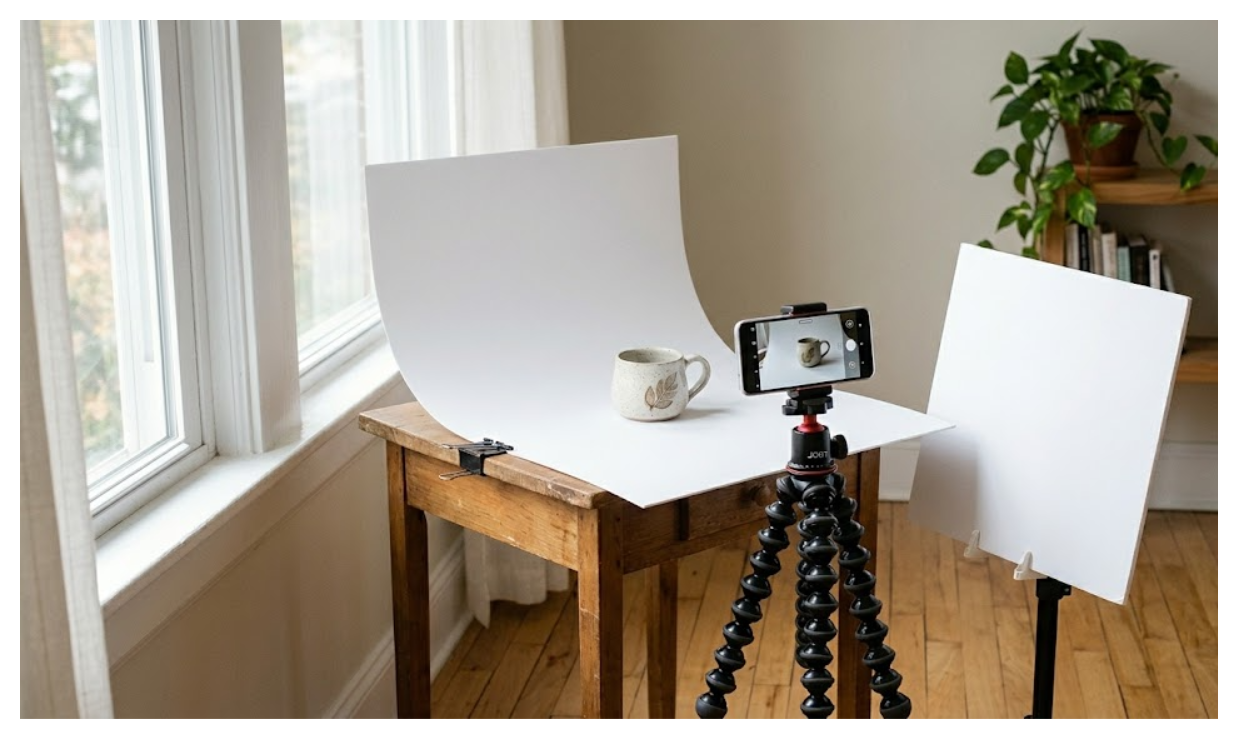
Pick one spot in your home or workspace and keep it set up permanently if you can. A table pushed against a wall near a window is enough to get started.
According to Shopify's own photography guide, a good standard table width for product photography is between 24 and 27 inches. Place it as close to the window as possible without the windowsill shadow falling across your setup. Start with the window at 90 degrees to the right or left of your product.
Once you have found a position that works, do not move anything. Tape down your background, mark where your tripod legs sit with small pieces of tape on the floor. The goal is to be able to walk away and come back a month later and recreate the exact same setup.
Use a White Background Every Time
A white background is the simplest way to make every photo look like it belongs to the same store. It reflects light evenly onto the product, removes visual distractions, and makes editing easier if you ever need to remove or adjust the background later.
You do not need expensive backdrop paper. A large sheet of white poster board from a stationery shop costs almost nothing. Curve it up the wall behind your product in an L-shape to create a seamless effect with no visible edge between the surface and the wall.
Keep the background pure white, not off-white or cream. Slightly warm tones make lighting harder to control and editing more time-consuming.
Lock Your Camera Position
Shopify's photography documentation specifically recommends keeping your camera and tripod in the same position throughout a shoot and rotating the product instead of the camera. This is the single most important thing you can do for consistency.
When you move the camera between shots, every image is framed slightly differently. When you keep the camera fixed and rotate the product, every image has the same frame, the same distance, the same perspective. Your store will look like a proper catalog rather than a collection of random snapshots.
A basic tripod costs under $30 and solves this completely. If you are shooting on a phone, a phone tripod mount works just as well.
Write Down Your Settings
This is the step most merchants skip and then wonder why their photos do not match between sessions.
After you find a setup that produces good images, write everything down. The distance from the camera to the product. The angle of the window relative to the setup. Which direction the product is facing. Any camera settings if you are shooting in manual mode.
Shopify’s photography workshop recommends treating this like a shot list. Record the angles you captured and make sure you get the same ones every time. This makes it possible to shoot new products weeks or months later and still have them match your existing catalog.
Control Your Light Source
Natural light from a window is free and produces good results for most products. The key is consistency, so shoot at the same time of day to keep the light quality consistent between sessions.
Overcast days produce softer, more even light than direct sunlight. If you are shooting in direct sun, the harsh shadows will look different from session to session as the sun moves.
If you want more control and do not want to depend on the weather or time of day, a basic softbox lighting kit gives you consistent artificial light you can reproduce exactly every time. Shopify recommends softboxes specifically because they diffuse light evenly and minimise harsh shadows.
A white foam board on the side opposite your light source acts as a reflector, bouncing light back into the shadow side of your product. This evens out the lighting without needing a second light.
Do You Need a Photographer?
For most products, no. A fixed setup with a white background, a tripod, and consistent light will produce professional-looking images with a smartphone.
The cases where a photographer genuinely helps are products that are technically difficult to shoot — clear or highly reflective items like glassware, jewellery, or metallic packaging. These require specific multi-light setups that are hard to get right without experience. If your main products fall into this category, one session with a photographer is worth it, and you can learn from watching them work.
For everything else, the consistency of your process matters more than the quality of your equipment.
What About Apps?
There are apps that remove or replace backgrounds from existing photos, which can help if you have a backlog of inconsistently shot images you want to standardise. These work reasonably well for simple products on plain backgrounds.
But no app fixes inconsistent framing or lighting. Those problems need to be solved at the shooting stage. The tools worth using are a tripod, a white background, and a written shot list. Everything else is secondary.
After the Photos: Alt Text
Once your images are consistent and uploaded to Shopify, make sure each one has descriptive alt text. Good product photos with no alt text are invisible to Google Images — which is a significant free traffic source for stores with visual products.
If you sell products in multiple colors, assigning the right images to each color variant so they switch automatically when a customer selects a color is an important next step after getting your photos consistent. The guide on showing different images for each color variant in Shopify covers the native method and when you need a theme feature or app to filter the full gallery.
If you need to update alt text across your whole catalog without opening every product one by one, AltMate shows all your product images in a single table and lets you edit and save from one place. It also flags which images are missing alt text so you can see the gaps at a glance.
For more on what to actually write in alt text, Shopify alt text best practices covers the common mistakes and the right approach.