Organic traffic means people finding your store through Google without you paying for ads. It takes longer to build than paid advertising, but it compounds over time. A page that ranks well today can keep bringing in visitors for years.
If you are starting from scratch and feel overwhelmed, here are the things that actually matter, in the order you should tackle them.
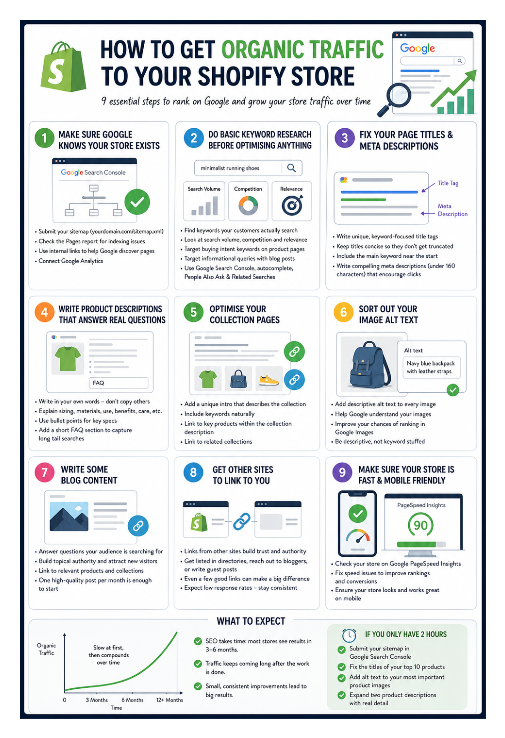
Step 1: Make Sure Google Knows Your Store Exists
Before anything else, submit your sitemap to Google Search Console. This is free and tells Google where to find all your pages so it can start indexing them.
In Shopify, your sitemap is automatically generated at yourdomain.com/sitemap.xml. Go to Google Search Console, add your property, verify ownership, and submit that URL. Without this step, Google may still find your store eventually, but submitting the sitemap speeds it up significantly.
Submitting a sitemap does not guarantee that your pages will be indexed. Check the Pages report in Google Search Console to see which pages are actually indexed and watch for issues like “Crawled but not indexed.” Internal linking between your pages also helps Google discover and prioritise what to index.
That technical work cannot create demand by itself. If your store already gets attention on marketplaces but very little direct traffic or sales, why a Shopify store can get no sales while Etsy and eBay perform well explains the difference between marketplace demand and traffic you must create yourself.
Also connect Google Analytics so you can see where your traffic is coming from and which pages people are actually visiting.
Step 2: Do Basic Keyword Research Before Optimising Anything
This is where most small shop owners skip ahead and waste effort. You can write perfect page titles and descriptions, but if you are targeting terms no one searches for, or terms dominated by large retailers, nothing will move.
Keyword research means finding the specific words and phrases your customers actually type into Google when looking for what you sell. There are two things to look for: search volume (how many people search for it) and competition (how hard it is to rank for).
For a small store, the sweet spot is specific, lower competition terms. Instead of targeting “running shoes,” which is dominated by Nike, Adidas, and Amazon, target phrases like “minimalist running shoes for flat feet” or “zero drop trail running shoes women.” These longer phrases have lower search volume individually, but you can actually rank for them, and the people searching are further along in the buying process.
Google Search Console is the best free starting point once your store has been live for a few weeks. Go to the Search results report and look at the queries your store already appears for. These are the searches where Google already considers your pages relevant, so optimise specifically for those terms first.
For finding new keywords before you rank for anything, Google’s autocomplete is free and underrated. Type your main product into Google and look at the suggestions, since each one is a real search people are making. The “People also ask” and “Related searches” sections at the bottom of the results page are also useful.
Step 3: Fix Your Page Titles and Meta Descriptions
Every page on your store has a title tag and a meta description. These are what appear in Google search results. They are one of the strongest signals Google uses to understand what a page is about.
In Shopify, you can edit these by scrolling to the "Search engine listing" section at the bottom of any product, collection, or page editor.
For product pages, a good title includes the specific product name and one key detail. Something like “Men’s Waterproof Hiking Boots, Lightweight with Ankle Support” is more useful than just “Hiking Boots.” Keep titles under 60 characters so they do not get cut off in search results.
Meta descriptions do not directly affect rankings but they affect whether someone clicks your result. Write them like a one-sentence pitch for the page. Keep them under 160 characters.
If you have a large catalog and need to update these in bulk, how to do bulk SEO on Shopify covers your options.
Step 4: Write Product Descriptions That Answer Real Questions
Thin product descriptions are one of the most common reasons Shopify stores struggle to rank. A two-sentence description that copies the manufacturer's text gives Google almost nothing to work with.
Think about what someone searches for before buying your product. They might want to know about sizing, materials, how it compares to alternatives, what it is best used for, or how to care for it. A product page that answers these questions in plain language is genuinely more useful, and Google rewards useful pages.
If customers cannot find a product using words from its description in your store's own search, Shopify store search not finding words in product descriptions or pages covers what to check.
Write in your own words. Avoid copying manufacturer descriptions, since if dozens of stores all use the same text, none of them are likely to rank well for it.
Step 5: Optimise Your Collection Pages
Collection pages are often neglected but they rank for broader category searches. Someone searching for "handmade soy candles" is searching at the category level, not for a specific product.
A collection page with no text beyond the product grid gives Google nothing to rank. Adding a short introductory paragraph that explains what the collection contains, who it is for, and what makes your version worth buying gives search engines something to work with and helps the page rank for category-level queries.
Step 6: Sort Out Your Image Alt Text
Every product image should have a short description in the alt text field. Google cannot see images the way a person does, so it reads the alt text to understand what is in them. Good alt text improves your chances of appearing in Google Images, which is a separate source of free traffic that most stores ignore.
The most common mistake is leaving alt text blank or just using the product title. A description like "Navy blue linen shirt with button-down collar, flat lay on white background" gives Google something useful that the product title alone does not.
Alt text should be descriptive but natural. Avoid stuffing keywords into it.
If you have a large catalog and want to update alt text without opening every product one by one, AltMate shows all your product images and their current alt text in a single table. For more on what makes alt text good or bad, Shopify alt text best practices covers the detail.
Step 7: Write Some Blog Content
Blog posts let you rank for informational searches related to your product category. Someone searching for "how to care for a leather bag" or "best plants for a north-facing window" is not ready to buy yet, but they are in your audience.
A blog post that answers that question well, and naturally mentions your products where relevant, can bring in readers who later become customers. It also builds what Google considers topical authority. The more genuinely useful content you have around a topic, the more Google trusts your site for queries in that area.
You do not need to post frequently. One well-written, specific article per month is more valuable than four generic ones.
Step 8: Get Other Sites to Link to You
Links from other websites signal to Google that your store is worth paying attention to. This is called link building and it is one of the harder parts of SEO.
For a new store, realistic options include getting listed in relevant directories, reaching out to bloggers or publications in your niche who might feature your products, or writing guest posts for other sites in your space. Even a few good links from credible sources make a real difference early on.
Step 9: Make Sure Your Store Is Fast and Mobile Friendly
Site performance affects both rankings and conversions. A slow store leads to higher bounce rates and fewer sales.
Check your store using Google PageSpeed Insights and fix obvious issues where possible. Make sure your store works well on mobile devices, since most traffic comes from phones. If you are considering a speed app, do Shopify speed optimisation apps actually work explains which fixes help and which ones only add another script to the storefront.
What to Expect
SEO takes time. Most stores do not see meaningful organic traffic from SEO efforts for three to six months, and building consistent traffic typically takes longer than that.
The upside is that unlike paid ads, the traffic does not stop when you stop paying. A well-optimised product page or a blog post that ranks for a useful query will keep bringing in visitors long after you wrote it.
Start with steps one through four. Get the fundamentals right before worrying about anything else. Small, consistent improvements over time are what build organic traffic. If you have done all of this and are still stuck, why your Shopify store is stuck at low traffic despite doing SEO covers the less obvious reasons.