The short answer is: some of them do specific things that genuinely help, but they are not the full solution most merchants expect, and the biggest causes of slow Shopify stores are usually already sitting in your admin waiting to be fixed.
Here is an honest breakdown of what these tools actually do, what they cannot fix, and what you should check before installing anything.
Why Site Speed Actually Matters
Before getting into the apps, it is worth being clear on why speed matters for a Shopify store specifically.
Google confirmed Core Web Vitals as an official ranking factor in 2021. These are three metrics, Largest Contentful Paint (LCP), Interaction to Next Paint (INP), and Cumulative Layout Shift (CLS), that measure how fast your pages load, how responsive they feel, and how stable the layout is. Shopify's own help center confirms that if your store performs poorly across these metrics, it may rank lower in search results even if everything else is well optimised.
Beyond SEO, speed affects conversion rates directly. As page load time increases from one second to three seconds, bounce rates increase by around 32%. Shoppers on mobile are especially sensitive to this. Google uses mobile-first indexing, meaning your mobile performance is what primarily determines your search rankings, not your desktop score.
So yes, speed matters. The question is whether apps are the right way to fix it.
What Most Speed Apps Actually Do
Speed optimisation apps on the Shopify app store generally offer some combination of the following:
Image compression and conversion to WebP format. This is genuinely useful. Unoptimised images are one of the most common causes of slow Shopify stores, particularly for the LCP metric. Serving images in WebP format rather than JPEG or PNG reduces file size significantly without visible quality loss.
Lazy loading. This delays loading images that are below the fold until the user scrolls to them, reducing the initial page weight. Also genuinely useful.
JavaScript and CSS minification. Removes unnecessary whitespace and characters from code files to reduce their size slightly. The impact is usually modest.
Predictive preloading. Some apps preload the next page a user is likely to visit when they hover over a link, making navigation feel faster. This improves perceived speed rather than actual load time.
These are all real techniques that can improve performance scores. The issue is that they address symptoms rather than the root causes of most slow Shopify stores.
The Real Causes of a Slow Shopify Store
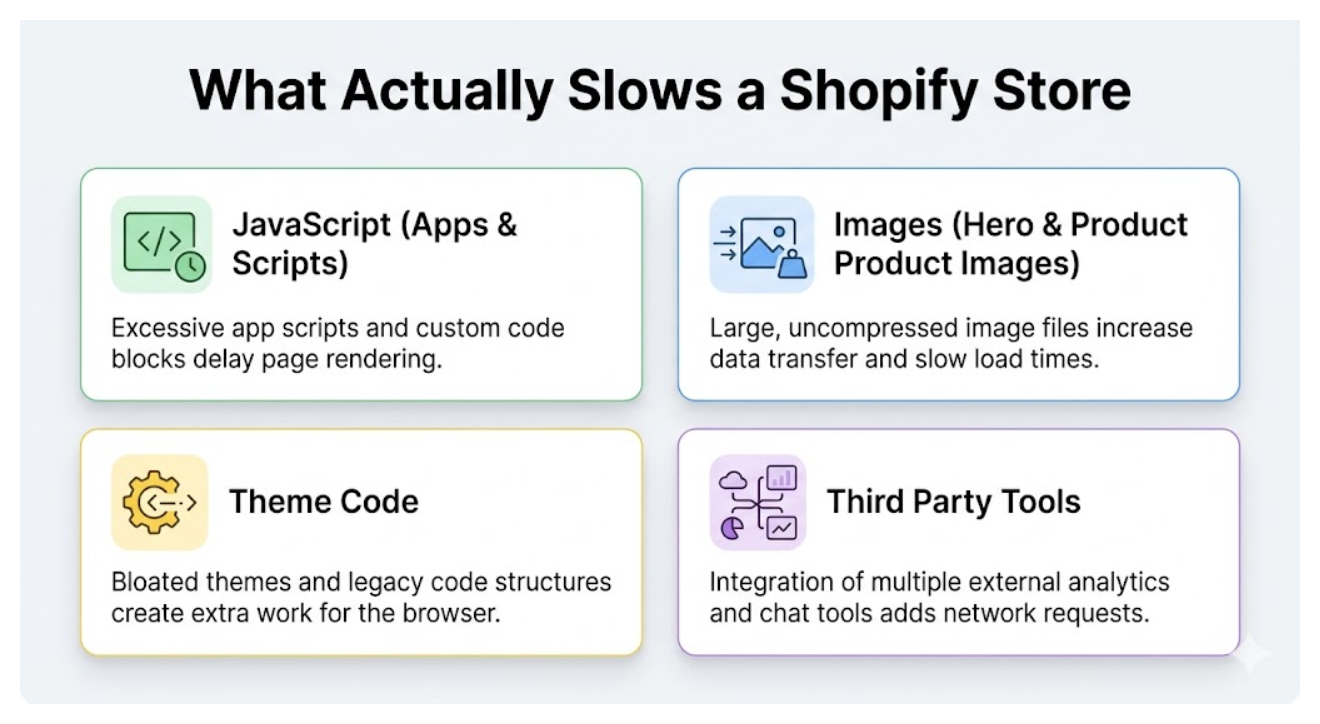
Most Shopify stores slow down for three reasons: too many apps, a bloated theme, and unoptimised JavaScript. Often it is a combination of all three.
Third-party apps. Every app you install adds JavaScript that loads on your storefront. Each app script adds somewhere between 150 and 300 milliseconds to your load time. If you have installed ten apps over the years, some of which you barely use anymore, that overhead adds up significantly. This creates an irony worth stating directly: installing a speed optimisation app to fix slowness caused by too many apps makes the problem slightly worse, not better.
Audit your installed apps and remove anything you do not actively use. Apps that you installed once and forgot about are often still running JavaScript on every page.
Your theme. Not all Shopify themes are built with performance in mind. Older themes or heavily customised ones often load large CSS files, render-blocking scripts, and redundant font files that slow down every page. Feature-rich premium themes sometimes include JavaScript for animations, carousels, and interactive elements that add significant weight even when those features are not actively being used on a given page.
Check whether your theme has a performance-optimised version available. Many theme developers release leaner updates specifically to address Core Web Vitals. If your theme is several years old and has had significant customisation layered on top, that alone can be a major source of slowness.
Custom JavaScript and liquid code. Any custom code added to your theme files, tracking scripts, chat widgets, custom features added by developers, contributes to the JavaScript load. Scripts that fire on every page load regardless of whether they are needed on that specific page are particularly wasteful.
If you have had developers make changes to your theme over time, it is worth reviewing what is in your theme.liquid file. Scripts added to the head section load before the page renders and can significantly delay how quickly a visitor sees content.
How to Diagnose Which Problem You Have
Before installing any speed app, check what is actually causing your slowness. Go to pagespeed.web.dev and enter your store URL. Run the test on mobile since this is what Google primarily uses for ranking.
Look at the Opportunities and Diagnostics sections specifically. These tell you whether your slowness is coming from unused JavaScript, render-blocking resources, large images, or something else. A store slowed by a bloated theme needs a different fix than one slowed by unoptimised images.
Also check Shopify's built-in performance dashboard in your admin under Online Store, then Themes. This shows your store's speed score and highlights the biggest contributors to slowness.
When Speed Apps Are Worth It
Speed apps are most useful when your main issue is image size and format. If you have a large product catalog with many unoptimised images, an app that automatically compresses and converts them to WebP saves significant manual work and will meaningfully improve your LCP score.
They are also useful for lazy loading if your theme does not already implement it. Many modern Shopify themes like Dawn include lazy loading by default, but older themes may not.
If your theme is already fast, your images are optimised, and you have audited your apps, a speed optimisation app is unlikely to move your scores significantly. You have already addressed the main problems.
What to Do Before Paying for a Speed App
Run PageSpeed Insights on your homepage and your most important product page and read the diagnostics.
Audit your installed apps and remove anything you do not actively use. This is free and often the highest impact change you can make.
Check whether your theme has a performance update available and apply it.
Check your hero image size. A hero image should ideally be under 180KB for good LCP performance. If yours is several hundred kilobytes, compress it before doing anything else.
If after all of this your scores are still poor, an app that handles image compression and lazy loading is a reasonable next step. TinyIMG is one of the better-reviewed options for image optimisation specifically. For more comprehensive speed and Core Web Vitals fixes, Hyperspeed has good reviews for its JavaScript deferral and script management features.
Speed and SEO Together
Improving your store's speed is one part of SEO, but it is worth keeping in perspective. Core Web Vitals are a tiebreaker signal. They matter most when other factors like content quality, keyword relevance, and backlinks are roughly equal between competing pages. A fast store with thin product descriptions and no backlinks will not outrank a slower store with genuinely useful content and links pointing to it.
Fix speed issues, but do not let chasing PageSpeed scores distract from the content and structural work that has more direct impact on rankings. For a full picture of what actually moves SEO results for a Shopify store, how to get organic traffic to your Shopify store covers the priorities in order.